
Cross-project / multi-donor time & effort allocation
Learn HR · Humanitarian / INGO HR · Task B5. The task that keeps an INGO's salary costs fundable. People in aid rarely work on one thing — a nurse splits a month across two grants, a coordinator across three projects. Time & effort allocation is how you record that split so each donor is charged for the effort it actually funded. It's a core Humentum competency, and where the UI couldn't express a split, this task built it out.
What it is
Time & effort allocation is the discipline of recording how a person's working time was divided across the projects, donors and grants they worked on — and it matters because donors fund effort, and will only pay for a share of a salary if you can show that share.
VanillaPM models it as a monthly timesheet per employee:
- The timesheet. One sheet per employee per month, moving draft → submitted → approved.
- Coded lines. Each line is a day's (or an activity's) hours, carrying the coding block — project · cost centre · donor · grant · funding source — exactly like a journal line. That coding is what lets effort be split across donors: 48 hours to Donor A's grant, 32 to Donor B's.
- Default from the assignment. A line can default its coding from the employee's live StaffAssignment (the planned allocation, CR-041) — one click — or you override it to record where the time actually went.
- A capacity guard on submit. You can't submit more effort than the period's capacity (working days × a standard day) — effort can't exceed availability.
- Maker ≠ checker on approval. You cannot approve your own timesheet.
And then the payoff, from the same coded lines:
- The donor lens — approved effort by donor, with each donor's share of the total.
- The utilisation lens — logged effort by project against each person's capacity.
The spine: a coded timesheet is donor-attributable effort; the allocation reports fall straight out of the coding block — grounded in Humentum (time & effort; cited for orientation, never reproduced).
Why it matters
- No time record, no salary charge. A donor will not let you charge 60% of a nurse's salary to its grant on an assertion. The time & effort record is the evidence that makes the charge legitimate — it's the single most-audited thing in grant finance.
- Multi-funding is the norm, not the exception. Field staff are routinely paid from several grants. Without a per-line coding block you can only say "she worked this month"; with it you can say "she gave 60% to the health grant and 40% to the nutrition grant," which is what every funder asks.
- It's the actuals that keep plans honest. The StaffAssignment is the plan; the timesheet is the actual. When they diverge — someone budgeted 50/50 but actually worked 80/20 — the timesheet is what tells the truth, and what re-forecasting and donor reports must use.
- One record, two obligations. The same coding serves HR (who worked on what) and finance (which grant bears the cost). Recording it once, consistently, is how those two never disagree.
Where you do it in VanillaPM
Timesheets & effort (apps/timesheets) — a month per person, with the allocation reports beneath.
-
Log coded effort, split across donors. Pick the employee and month; Add line captures the hours, an activity, and — the heart of it — the coding: the project, donor and grant the effort is charged to (leave blank to default from the live assignment). This is what lets one month's effort be divided across the funders who paid for it.
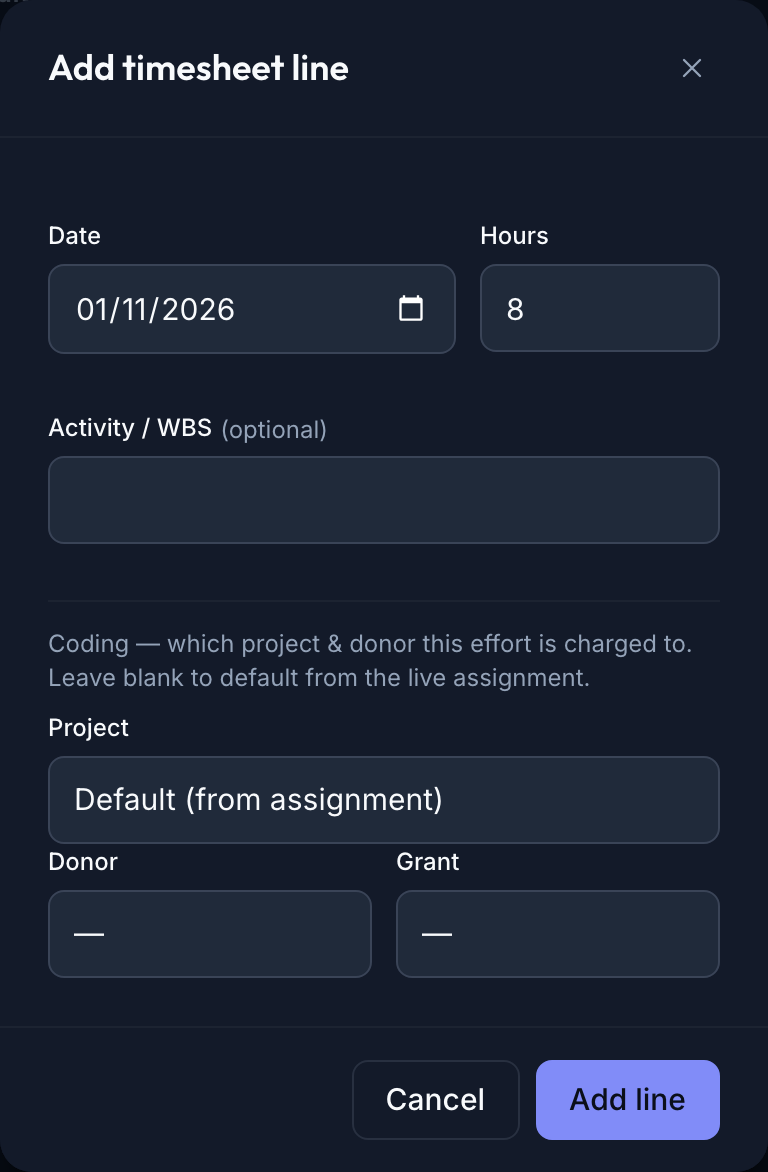
The Add timesheet line dialog — date, hours, an optional activity/WBS, and a Coding section (Project, Donor, Grant selects) with the note that blank defaults from the live assignment — the control that lets effort be split across donors/grants -
Submit, approve, and read the two lenses. The sheet shows its status and effort vs capacity; submit runs the capacity guard, approval needs a different person. Once approved, the same coded lines produce Approved effort by donor (each donor's hours and share) and Staff utilisation by project — the donor lens and the utilisation lens, from one coding block.
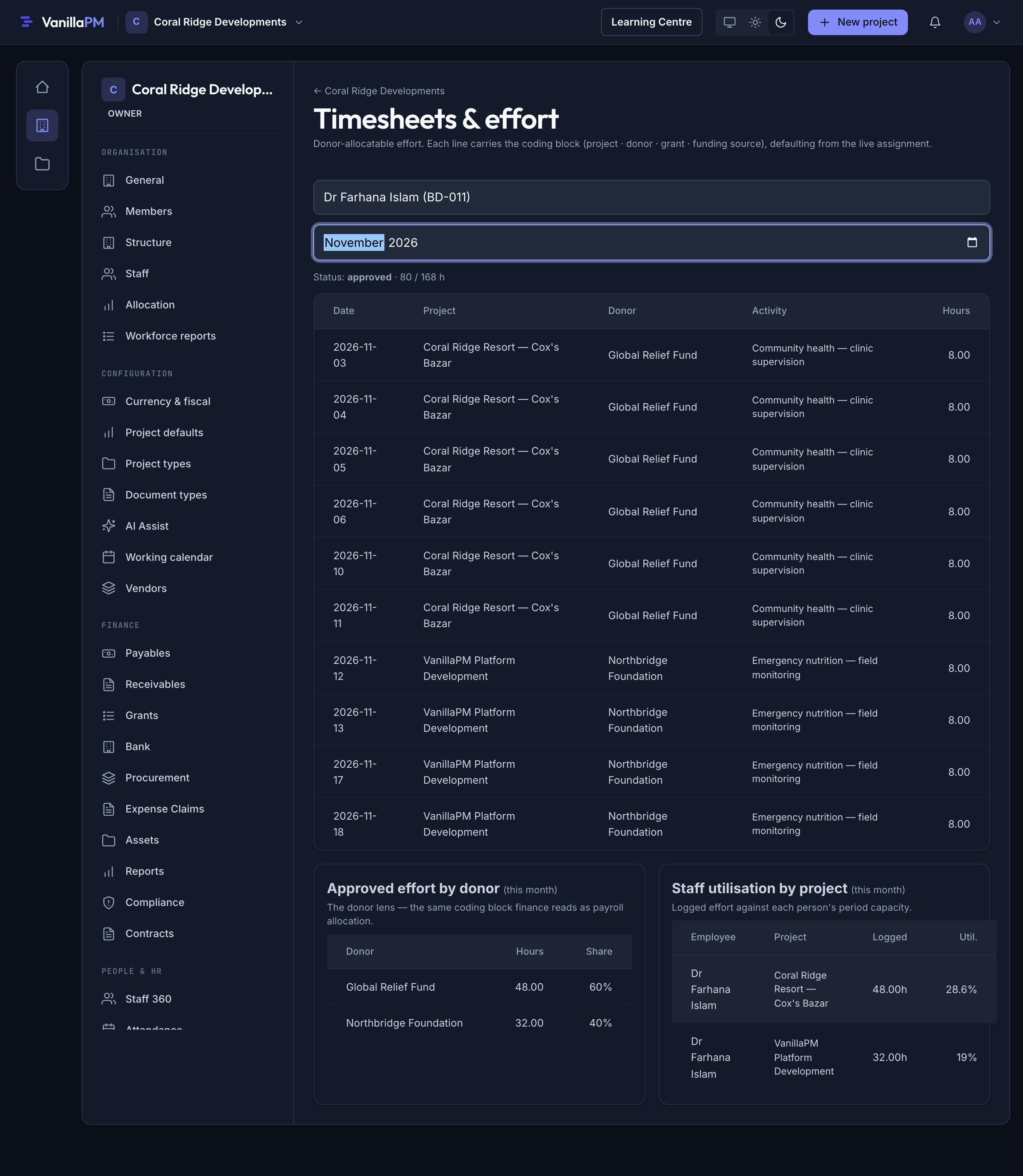
Dr Farhana's approved November timesheet — status approved, 80/168h, lines split between Global Relief Fund (community health) and Northbridge Foundation (emergency nutrition); below, an 'Approved effort by donor' card (Global Relief Fund 48h 60%, Northbridge Foundation 32h 40%) captioned 'the same coding block finance reads as payroll allocation', and a 'Staff utilisation by project' card
⚠️ Honesty box — one coding block, two lenses (effort here, cost in payroll)
The timesheet records effort — hours, coded to a donor/grant. It does not compute the money. Charging the right share of the salary to each grant is payroll's job (CR-056 payroll allocation — the finance twin of this task, in the finance track), which reads the same coding block on an actuals basis. That's the phrase to hold onto: one coding block, two lenses — HR sees time by donor, finance sees cost by donor, and they can't disagree because it's the same coding. Two further honesties: the plan (the StaffAssignment, CR-041) and the actual (this timesheet) are shown separately and won't always match — reconciling them is the officer's judgement, not an automatic merge; and the tool doesn't police that your coded effort matches what each grant actually funded — it gives you the record and the lens, but honest coding is on you. This lesson teaches the record and is clear that the cost allocation lives next door in payroll.
Walked example — a split month at Hilsa
Dr Farhana Islam works November across two Hilsa grants. In her timesheet, each day is coded:
- 48 hours → Global Relief Fund (the community-health grant) — clinic supervision.
- 32 hours → Northbridge Foundation (the emergency-nutrition grant) — field monitoring.
She logs 80 hours against a 168-hour November capacity, submits (under capacity — the guard passes), and a different person approves (maker ≠ checker). The instant it's approved, the donor lens reads straight off her lines: Global Relief Fund 48h = 60%, Northbridge Foundation 32h = 40%. That 60/40 is exactly what Hilsa needs: when payroll runs, it will charge 60% of Dr Farhana's salary to the health grant and 40% to the nutrition grant — because the same coding block she filled in as effort is what payroll reads as cost. One sheet, coded once, answers both "what did she work on?" and "which donor pays for her?"
The utilisation lens tells the other half of the story — her logged effort against her capacity by project — which is how a manager sees whether someone is over- or under-committed across the portfolio.
The two lenses — one coding block
| Lens | Reads | Who uses it | Where it lives |
|---|---|---|---|
| Effort by donor | approved hours per donor, and each donor's share | HR / grant mgmt — the time-&-effort evidence | here (timesheets) |
| Utilisation by project | logged hours vs each person's capacity | managers — who's over/under-committed | here (timesheets) |
| Cost allocation | the salary $ split across grants by the same % | finance / payroll — the charge to each grant | payroll (CR-056) |
The point of the table is the last column: the cost lens isn't here — it's in payroll — but it reads the identical coding this timesheet carries. Record the effort-split once; the money-split follows.
What an officer reads from the donor lens:
- Each donor's share — the % that justifies the salary charge to that grant.
- The
(unassigned)row — effort with no donor coding is effort you can't charge to a funder; it's the first thing to chase. - Plan vs actual drift — if the split doesn't match the budgeted StaffAssignment, the budget (or the behaviour) needs a look.
Controls & assurance
- The capacity guard. Submitting a sheet whose effort exceeds the period capacity is blocked — you can't log 200 hours in a 168-hour month. A sanity control, not a pay rule.
- Maker ≠ checker. You can't approve your own timesheet; effort is attested by someone else.
- Coding = attribution. Because every line carries the coding block, the donor split is evidence, not an estimate — "60% to the health grant" is backed by coded lines, not a round number.
- Approved-only reporting. The donor and utilisation lenses read approved lines only — draft effort doesn't leak into a donor report.
- Org-unit scoping. Timesheets respect org-unit RBAC — you see and act on sheets within your part of the organisation, not everyone's.
- Honesty box — effort recorded here, cost computed in payroll. This is the actuals record of effort; the salary-cost allocation is payroll's calculation reading the same coding (one coding block, two lenses). The record proves where the time went; it doesn't pay anyone.
Best practices & pitfalls
- Do code every line to a donor/grant where the work is grant-funded — an
(unassigned)line is effort you can't bill to a funder. - Do record the actual split, even when it diverges from the plan — the timesheet's value is that it's the truth, not a copy of the budget.
- Do keep coding consistent with how finance allocates the salary, so HR's effort lens and payroll's cost lens reconcile.
- Pitfall: logging a lump of hours with no donor coding and sorting it out "later." Later never comes, and the grant charge can't be justified.
- Pitfall: treating the StaffAssignment plan as the actual. The plan is what you intended; the timesheet is what happened — don't report the plan as if it were effort.
- Pitfall: approving your own sheet, or submitting impossible hours. Both are blocked, and both are red flags if someone tries.
- Pitfall: thinking the timesheet charges the salary. It records the effort; payroll does the money — expecting a dollar figure here is looking in the wrong lens.
Practise question
Q1. A programme officer's November timesheet logs 80 hours, all coded to one project with no donor on any line, even though she's funded 50/50 by two grants. Finance asks you to charge half her salary to each grant. Can you, from this record — and what should the timesheet have captured?
Answer: No — not defensibly. The record shows 80 hours on a project, but with no donor
coding on any line, the donor lens can only file it as (unassigned) — there is no evidence
of a 50/50 split, just an assertion that she's "funded 50/50." Charging each grant half her salary on
that basis is exactly what a donor audit disallows: you'd be allocating cost with no time-and-effort
support. What the timesheet should have captured is the split in the coding block — roughly 40
hours coded to Grant A and 40 to Grant B (the actual division of her effort), so the donor lens
reads 50/50 and payroll can charge each grant 50% of her salary reading the same coding. The
fix going forward: code every line to the donor/grant the work served, record the actual split
(not just the budgeted one), and never let grant-funded effort sit (unassigned). The principle is the
whole lesson — the salary charge is only as good as the coded effort behind it, and "one coding
block, two lenses" only works if the coding is actually there.
Your hands-on assignment
Code one month across two donors and read both lenses. In a demo organisation — never live staff data (your names and figures will differ from Hilsa's):
- In Timesheets & effort, pick an employee and month; Add line for hours coded to one donor's grant.
- Add a second line coded to a different donor — and one line with the coding left blank (it defaults from the assignment).
- Submit — check the capacity guard — and approve it as a different person.
- Read Approved effort by donor: work out each donor's share yourself first, then check it.
- Read Staff utilisation by project and say what payroll will do with the same coding.
When you've done it, test yourself with the knowledge check below — a short quiz drawn from this lesson. Score 80% or more and the lesson is marked complete.
Terms used here
- Time & effort allocation — recording how a person's working time divided across projects/donors/ grants, so each funder is charged for the effort it funded.
- Timesheet — the monthly, per-employee sheet (draft → submitted → approved) of coded effort lines.
- Coding block — project · cost centre · donor · grant · funding source on each line; the same dimensions a journal line carries.
- Default coding — one-click coding from the employee's live StaffAssignment (the planned allocation, CR-041).
- Capacity guard — the submit-time rule that effort can't exceed the period's working-day capacity.
- Effort-by-donor (the donor lens) — approved hours and share per donor; the time-&-effort evidence.
- Cost allocation (the finance lens) — the salary $ split across grants by the same coding, computed in payroll (CR-056) — not here.
- One coding block, two lenses — HR reads the coding as time by donor; finance reads it as cost by donor; it's the same coding.
- Maker ≠ checker — you can't approve your own timesheet.
- Humentum — the sector standard for time & effort (cited, not reproduced).
- Related: Read the org structure — the StaffAssignment plan this is the actual of · Field per-diems & travel — the same coding block on a trip's cost (B4).
What an auditor / donor expects
They expect the salary charge to stand on a time record. A Humentum-aligned reviewer or a donor's
grant audit asks: for everyone whose salary is charged to this grant, is there an approved timesheet
whose coded effort supports the percentage charged? Is grant-funded effort coded to the
grant (not sitting (unassigned))? Was the sheet approved by someone other than the employee, and
within capacity? And does the effort split reconcile with the cost split payroll applied —
one coding block, two lenses? The timesheet plus the donor lens answer it: "here's her approved
November sheet, coded 60% to the health grant and 40% to nutrition, approved by her manager, within
capacity — and that's the same 60/40 payroll charged." "We're pretty sure she's roughly half-and-half"
is the answer that gets a cost disallowed; "every charged hour is coded and approved" is the one that
survives the audit — and exactly what this record, and this lesson, are built to produce.
Sign in to track your progress and earn your track completion.
🎉 You finished the track — view your completion →