
Offboard / separation
Learn HR · Generalist HR Lifecycle · Task A9. The last task in the lifecycle, and the one most often done badly: getting someone out cleanly — the right access removed on the right day, the final money settled, and the record straight — so the exit is as controlled as the hire was. This closes the hire-to-retire arc.
What it is
A separation is the managed end of someone's employment. It has a type, because the type drives everything that follows:
- Resignation — the employee leaves.
- Termination — the organisation ends it (often the outcome of a disciplinary case).
- Retirement — end of career.
- Contract end — a fixed-term engagement concludes.
Each separation is a case with a last working day and a reason. Working the case has two jobs that must land by that day:
- Access removal (asset return). Systems access, building access, devices, keys — revoked and returned. On the last day, not a week later. The case records that it's done; the actual revocation happens in the IT and asset systems.
- Final pay. Outstanding salary, untaken-leave settlement, any dues — paid. The case records a settlement reference; the amount is computed in payroll, not here.
Finalising the case flips the employee to Separated and writes a row to the lifecycle timeline — the same timeline that headcount and attrition are read from.
Two ideas make it a discipline:
- The exit is dated and controlled. "They left sometime last month" is how access lingers and final pay slips. A case with a last day, a recorded asset return, and a settlement reference is how you prove the exit was clean.
- Recorded here, executed elsewhere. HR owns the record of the exit; payroll computes the pay and IT revokes the access. The separation case is the control point that says it happened — it doesn't pretend to be the payroll engine or the identity system.
Grounded in SHRM Offboarding and HRCI competency areas (cited for orientation, never reproduced).
Why it matters
- Lingering access is the classic security hole. The account that was never disabled, the laptop never returned — offboarding is where those get closed, or don't.
- Final pay is a legal obligation with a clock. Getting the last payment wrong, or late, is a compliance and trust failure; the settlement reference ties the HR exit to the payroll run that settled it.
- Attrition is a signal you only get if exits are recorded. Every separation writes the timeline; headcount and attrition fall out of it. Unrecorded exits mean flying blind on turnover.
- A clean record protects everyone. "Here's the type, the last day, that access was removed and pay settled, and who's now Separated" is the defensible close — for a reference, an audit, or a dispute.
Where you do it in VanillaPM
Onboarding & separation (apps/onboarding) — the full employee lifecycle on one page. A
step-by-step:
-
Start a separation. Start separation — the employee, the kind (resignation · termination · retirement · contract end), the last working day, and a reason. It opens an in-progress case: the exit is now on the books with a date to work to.
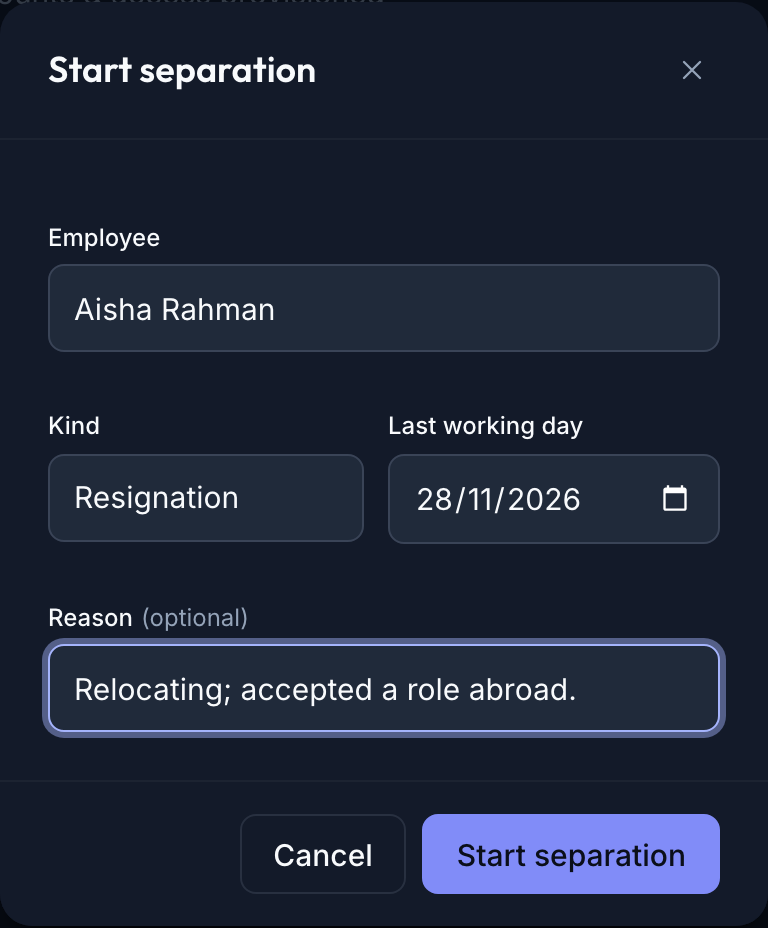
The Start separation dialog — an employee, a Kind (resignation / termination / retirement / contract end), a last working day and a reason; opens an in-progress separation case -
Finalise — access removal & final pay. When the exit is done, Finalise: tick assets returned & access removed (recorded here; the actual revocation is in the IT/asset systems), and record the final-pay settlement reference (the payroll run / AP reference — the amount is computed in payroll). Finalising flips the employee to Separated and writes the lifecycle row.
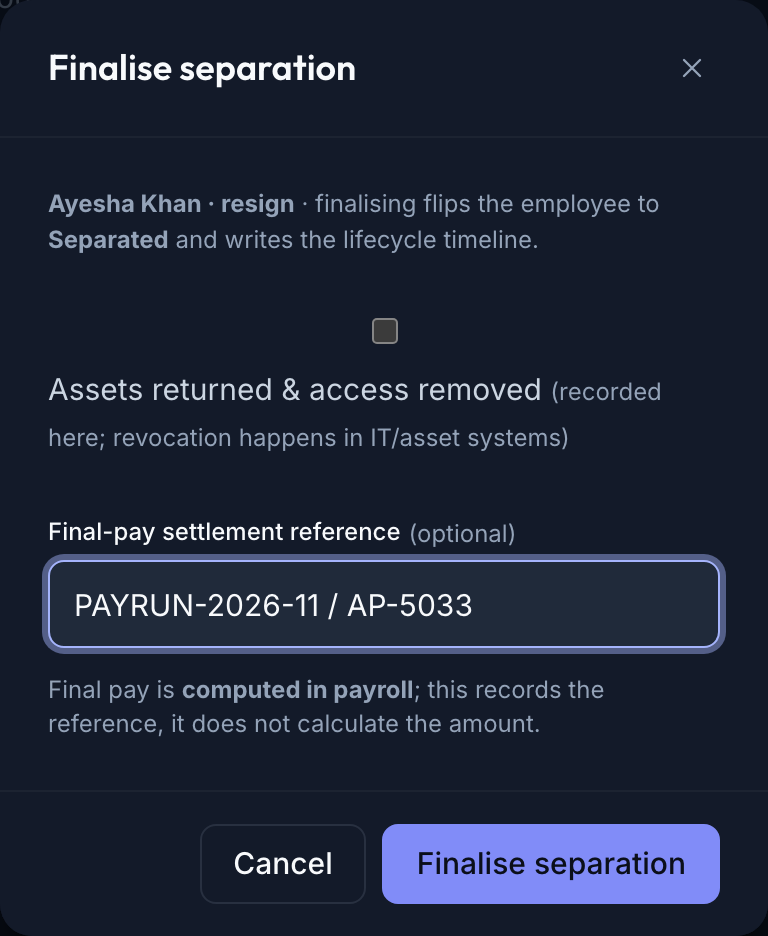
The Finalise separation dialog — an 'assets returned & access removed' checkbox and a final-pay settlement reference, with notes that finalising flips the employee to Separated and that final pay is computed in payroll -
The register & the lifecycle. The separations register shows each case by type, last day, status, whether access/assets are returned, and the final-settlement reference. Finalised cases have flipped their employee to Separated — which is why the page's headcount drops and attrition moves. The exit becomes a number you can read.

The separations register — a table of cases (employee · kind · last day · status · access/assets returned · final settlement), e.g. a finalised contract-end with assets returned and a PAYRUN settlement ref alongside in-progress resignation and retirement cases
Walked example — three exits at Meridian
- Ayesha Khan — resignation, in progress. Last day 2026-11-28, "relocating; accepted a role abroad." The case is open: access still pending, no settlement yet. The work now is to land both by her last day.
- Bikash Chandra — contract end, finalised. Fixed-term concluded 2026-10-31; assets ✓ returned, final settlement PAYRUN-2026-10 / AP-4821. Finalising flipped him to Separated — which is exactly why Meridian's headcount is now 19, not 20. A clean, closed exit.
- Ingrid Lindqvist — retirement, in progress. Last day 2026-12-31 after twelve years. Open, access pending — a planned, dignified exit to work to the date.
Read together they're the attrition story: one finalised exit this period, two more coming — headcount 19, attrition 10.8% — all of it falling out of the lifecycle timeline the cases write.
The records — what a separation captures
| What it captures | Who reads it | |
|---|---|---|
| Separation case | employee · kind · last day · reason · status | HR — the exit and its type; management — the attrition picture |
| Access / asset return | whether systems/assets were returned by the last day | security & IT — the revocation confirmation; audit — the control |
| Final settlement | the payroll/AP reference for the final pay | finance & payroll — the tie to the run that settled it |
| Lifecycle timeline row | an EmployeeStatusChange → Separated |
headcount & attrition — the numbers read straight off it |
What an HR officer reads from it:
- Access pending past the last day — the single most important red flag; an exit that's "done" but still has access isn't done.
- A settlement reference, not an amount — the case proves pay was settled and points at the run; the figure lives in payroll.
- The attrition move — a finalised separation is a headcount of one leaving; the rate updates because the timeline recorded it.
Controls & assurance
- Finalising writes the lifecycle. You can't "sort of" separate someone — finalising flips them to Separated and writes the timeline row, which is what headcount and attrition read. The number can't drift from the record.
- Access removal is recorded, revocation is executed elsewhere. The case records that assets were returned and access removed; the actual disabling of accounts and collection of devices happens in the IT and asset systems. HR confirms it; HR doesn't do it from here.
- Final pay is recorded, computed in payroll. The settlement reference ties the exit to the payroll run; the amount is payroll's calculation (CR-055/060). The two stay separate and deliberate — HR doesn't compute severance in the separation case.
- Access-gated. Separation needs the
onboardingedit capability — exits aren't something any general user can record or finalise. - Honesty box — the record, not the executor. VanillaPM is the system of record for the exit: it proves the separation happened, cleanly and on time. It is not the identity provider that disables the account, nor the payroll engine that computes the last cheque. The lesson doesn't pretend the checkbox revokes access or the reference pays the money — it records that both were done, and points at where.
Best practices & pitfalls
- Do start the case as soon as the exit is known, with the real last day — it's the clock everything else works to.
- Do confirm access removal on the last day and record it then — a checkbox ticked optimistically in advance is worse than none, because it says "done" when it isn't.
- Do record the settlement reference so the exit and the payroll run reconcile — "paid, trust me" doesn't close the loop.
- Pitfall: leaving a separation "in progress" forever. An unfinalised exit never writes the lifecycle row, so headcount and attrition are quietly wrong.
- Pitfall: treating the access checkbox as the revocation. Ticking it doesn't disable anything — it records that someone did, in the real systems. Tick it because it's true, not to close the task.
- Pitfall: trying to compute the final pay here. The amount is payroll's job; this records the reference. Don't reinvent severance maths in the separation case.
Practise question
Q1. An employee's last day was last Friday. The manager says "all done, they've left." You open the separation case: it's still in progress, access shows pending, and there's no settlement reference. What's actually outstanding, and what does finalising it change?
Answer: Three things are outstanding, and "they've left" covers none of them. First, access is still pending — which, past the last day, is a live security gap: the accounts and assets need to be confirmed revoked and returned in the IT/asset systems, and then recorded here. Second, final pay has no settlement reference — the last payment needs to run in payroll and its reference captured, or you can't prove the person was paid what they were owed. Third, the case is still in progress, so it has not written the lifecycle row — meaning this person still counts in headcount and hasn't moved attrition; the numbers are wrong until you finalise. Finalising, once access and pay are genuinely done, ticks the asset-return, records the settlement reference, flips the employee to Separated, and writes the timeline — which is what makes headcount and attrition correct. Note the boundary throughout: the case records and proves the exit; the revocation and the payment themselves happen in the systems that own them.
Your hands-on assignment
Take one exit from start to finalised and watch headcount move. In a demo organisation — never your live records (your names and figures will differ from Meridian's):
- In Onboarding & separation, click Start separation — employee, kind (e.g. contract end), last working day and a reason.
- Note the case is in progress and the employee still counts in headcount.
- Finalise it: tick assets returned & access removed and record a final-settlement reference.
- Check the employee is now Separated and the page's headcount has dropped.
- Say where the final-pay amount is actually calculated — and why it isn't on this page.
When you've done it, test yourself with the knowledge check below — a short quiz drawn from this lesson. Score 80% or more and the lesson is marked complete.
Terms used here
- Separation — the managed end of employment, by type.
- Separation type — resignation · termination · retirement · contract end; drives what the exit requires.
- Last working day — the date access must be removed and the exit landed by.
- Access removal / asset return — revoking systems/building access and collecting devices; recorded on the case, executed in IT/asset systems.
- Final settlement — the payroll/AP reference for the final pay; the amount is computed in payroll.
- Lifecycle timeline — the
EmployeeStatusChangerows (…→ Separated) that headcount and attrition are read from. - Related: Read the org structure & headcount — the headcount this exit moves · Handle an employee-relations case — where a termination comes from.
What an auditor / HR lead expects
They expect the chain to hold: separation → last day → access removed → final pay settled → finalised → Separated on the timeline, with nothing left dangling. Every exit has a type and a date; every finalised case shows access/assets returned and a settlement reference; and every finalised case has moved the person to Separated, so headcount and attrition reconcile to the record. A reviewer asks "show me everyone who left this year, that their access was removed and their final pay settled," and the register plus the lifecycle timeline answer it. "Here's the separation, the type, the last day, that access was removed and pay settled by reference, and that they're now Separated" is a complete answer; a person who "left" with access still live and no record is the opposite of one — and exactly what clean offboarding exists to prevent.
Sign in to track your progress and earn your track completion.
🎉 You finished the track — view your completion →