
Set the cost baseline, aligned to the WBS
Learn Finance · Project & Cost Finance · Task A2. Freeze the approved estimate into a time-phased baseline — the one number "over budget" is measured against.
Also drill the formulas in PMP Reps → Finance · Cost & EVM.
What it is
The cost baseline is the approved, time-phased budget — the estimate (A1) rolled up the WBS, spread across the schedule, and locked. It's what you measure actual spend against, and it can only change through formal change control.
Two things sit alongside the baseline, and confusing them is a classic error: - Contingency reserve — money for known risks (known-unknowns), inside the cost baseline, controlled by the PM. - Management reserve — money for unknown-unknowns, above the baseline, released by management.
So: cost baseline = work packages + contingency; total budget = cost baseline + management reserve.
Why it matters
- Without a baseline, "over budget" has no meaning. Earned Value (A4) measures everything against it — no baseline, no performance measurement.
- Time-phasing is what makes variance real. $1M spent isn't good or bad until you know whether $1M should have been spent by now (the Planned Value curve).
- Reserves in the wrong place mislead everyone. Padding line items hides risk money; booking management reserve inside the baseline makes you look on-budget when you're not.
Where you do it in VanillaPM
Everything below is in Project → Budget (apps/budget). A step-by-step:
-
Promote the approved estimate. Approving the estimate in Estimate (A1) creates the baseline — a BudgetEntry per WBS node / category carrying its baselined cost. So Meridian's $2.0M lands here as the figure every variance is measured against.
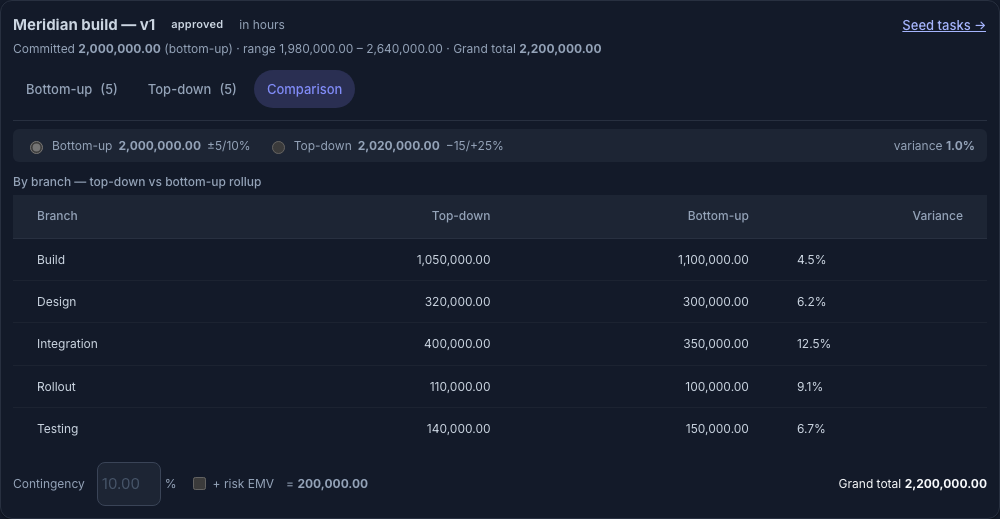
Step 1 — the approved Meridian estimate (from A1): approval locks the number and promotes it to the cost baseline -
Check it traces to the WBS. Each BudgetEntry is tied to a work package (
apps/wbs), so every baseline dollar maps to real scope — no un-sourced lump sums.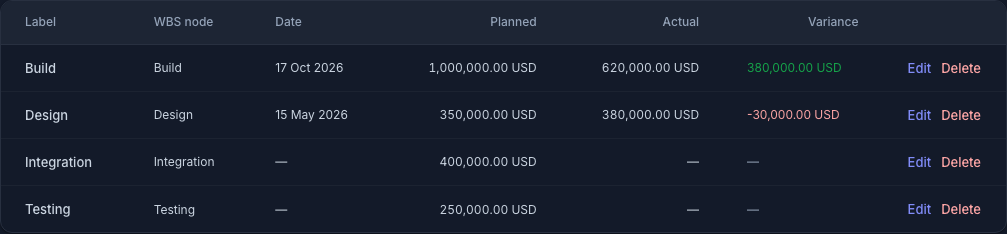
Step 2 — the baseline lines, each tied to a WBS work package (Design · Build · Integration · Testing), planned vs actual -
Read the S-curve. The budget view time-phases the baseline into a cumulative S-curve (planned value over time) — the shape EV and AC are later compared against (A4).
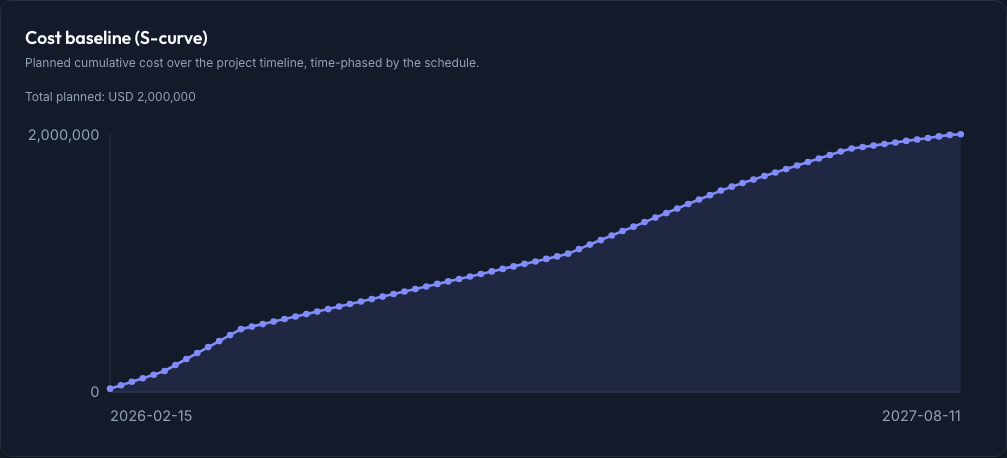
Step 3 — the cost baseline S-curve: $2.0M time-phased across Meridian's 18 months -
Set the reserves explicitly. In Budget Reserves, size contingency (inside the baseline, for known-unknowns) and management reserve (above it, for unknown-unknowns), per the org's FinancePolicy. Named reserves, never padding hidden in the lines.
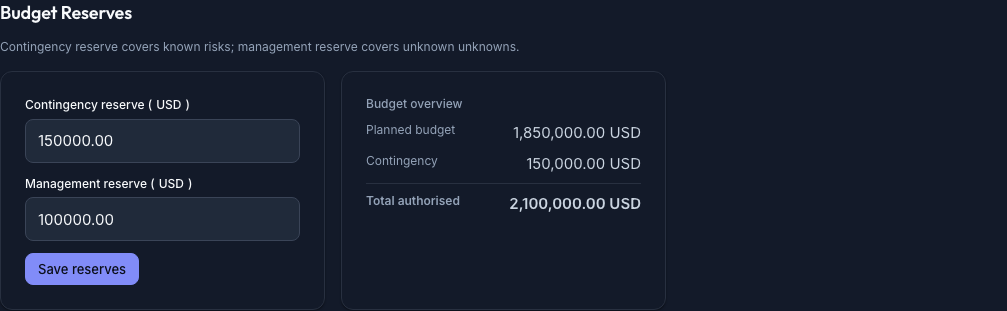
Step 4 — Budget Reserves: $150k contingency + $100k management reserve on top of the $1.85M work packages = $2.1M authorised -
Baseline it. Once set, the baseline is the frozen reference; later changes flow through integrated change control (a re-baseline is a deliberate, approved act — not an edit).
Walked example — Meridian
The approved $2,000,000 estimate becomes the cost baseline, time-phased across 18 months:
| Amount | |
|---|---|
| Work packages (from the WBS) | 1,850,000 |
| Contingency reserve (known risks) | 150,000 |
| Cost baseline | 2,000,000 |
| Management reserve (unknown-unknowns) | 100,000 |
| Total project budget | 2,100,000 |
The S-curve says that by month 9, the baseline plans $1,000,000 of cumulative spend (the Planned Value) — the reference point every status report leans on.
The numbers
The identity to hold: BAC (Budget at Completion) = the cost baseline total = $2,000,000. The Planned Value at any date is just the baseline's cumulative curve to that point — at month 9, PV = $1,000,000. Management reserve ($100k) is not in the BAC; it's drawn only on an approved change, which then moves money into the baseline.
Controls & assurance
- A baseline that traces to the WBS — no orphan budget.
- Reserves disclosed and placed correctly — contingency in, management reserve above.
- Change control on every baseline change — the baseline is a controlled document, not a spreadsheet anyone edits.
- A time-phased S-curve, so variance is always measured against "what should be spent by now."
Best practices & pitfalls
- Do time-phase the baseline — a flat total can't support Earned Value.
- Do keep contingency explicit and PM-owned; don't bury it in padded line items.
- Pitfall: treating management reserve as spendable budget. It isn't yours until a change releases it.
- Pitfall: quietly re-baselining to erase a variance. The baseline only moves through change control — otherwise you lose the ability to measure performance at all.
Practise question
Q1. Your work packages total $900k, contingency is $100k, and management reserve is $80k. What is the cost baseline, the BAC, and the total budget?
Answer: Cost baseline = work packages + contingency = $1,000,000; BAC = the cost baseline = $1,000,000 (management reserve is excluded); total budget = baseline + management reserve = $1,080,000. EVM measures against the $1,000,000, never the $1,080,000.
Your hands-on assignment
A baseline is only useful if you can read it. Go and read one. In a demo project (your figures will differ from Meridian's, and that's fine):
- Open Budget and check that every budget line is tied to a WBS node — a line with no WBS link can't be traced.
- Scroll to Cost baseline (S-curve) and read the total planned and the shape: where does spend ramp up?
- Pick a month and estimate the planned value to date from the curve.
- In Planning → Budget Reserves, set a contingency and a management reserve, save, and read the Total authorised — the reserves sit on top of the planned budget.
- Say which reserve you could draw on yourself, and which needs a change request.
When you've done it, test yourself with the knowledge check below — a short quiz drawn from this lesson. Score 80% or more and the lesson is marked complete.
Terms used here
- Cost baseline — the approved, time-phased budget (work + contingency), changed only by change control.
- BAC (Budget at Completion) — the baseline total; the finish line EVM measures toward.
- Planned Value (PV) — the baseline's cumulative cost to a point in time.
- Contingency vs management reserve — known-unknowns (in baseline, PM) vs unknown-unknowns (above, management).
- Related: Track commitments vs actuals — seeing money spent-and-committed against this baseline.
What the sponsor / PMO expects
A locked, time-phased baseline that traces to the WBS, with reserves disclosed and in the right place — and that doesn't move without a change request. That stability is the whole point: it's what makes every later status number (CPI, SPI, EAC) mean something.
Sign in to track your progress and earn your track completion.
🎉 You finished the track — view your completion →